처음으로 스프링 시큐리티를 적용하고, 빠르게 개발 중에 이상하게 로그인 요청만 하면 에러가 떴다. 콘솔은 감감무소식이고, 에러 페이지를 커스텀하여 해당 페이지에는 '에러페이지' 단 다섯 글자만 띄워서 에러를 찾을 수 없었다. 잠시 커스텀 에러 페이지 컨트롤러를 없애고 다시 에러를 확인했다.
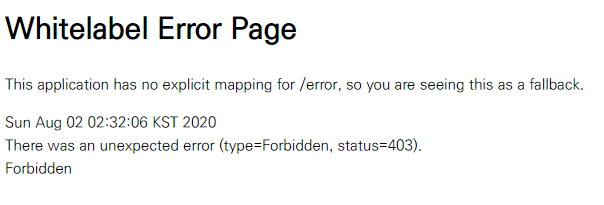
Forbidden, 403 에러. 권한 문제로 발생하는 오류로, 스프링 시큐리티는 csrf 토큰이 필요한데 이가 없어서 발생한다.
설정 클래스 내에 httpSecurity.csrf().disable();를 입력해준다. 전체적인 코드는 아래와 같고, 중요한 것은 HttpSecurity 를 인자로 받는 configure 메소드를 확인하면 된다.
import org.springframework.context.annotation.Bean;
import org.springframework.context.annotation.Configuration;
import org.springframework.security.config.annotation.web.builders.HttpSecurity;
import org.springframework.security.config.annotation.web.builders.WebSecurity;
import org.springframework.security.config.annotation.web.configuration.EnableWebSecurity;
import org.springframework.security.config.annotation.web.configuration.WebSecurityConfigurerAdapter;
import org.springframework.security.crypto.bcrypt.BCryptPasswordEncoder;
import org.springframework.security.crypto.password.PasswordEncoder;

@Configuration
@EnableWebSecurity
public class SecurityConfig extends WebSecurityConfigurerAdapter {
    @Bean
    public PasswordEncoder passwordEncoder(){
        return new BCryptPasswordEncoder();
    }

    @Override
    protected void configure(HttpSecurity httpSecurity)throws Exception{
        httpSecurity.csrf().disable();
    }

    @Override
    public void configure(WebSecurity webSecurity)throws Exception{
        webSecurity.ignoring().antMatchers("/css/**", "/fonts/**", "/images/**", "/js/**", "/plugins/**");
    }
}